Documentation

Dashboard
The Dashboard feature gives you a great opportunity to display open task, stats and important information to users or user groups. Dashboards can be configured individual simmilar like custom forms.
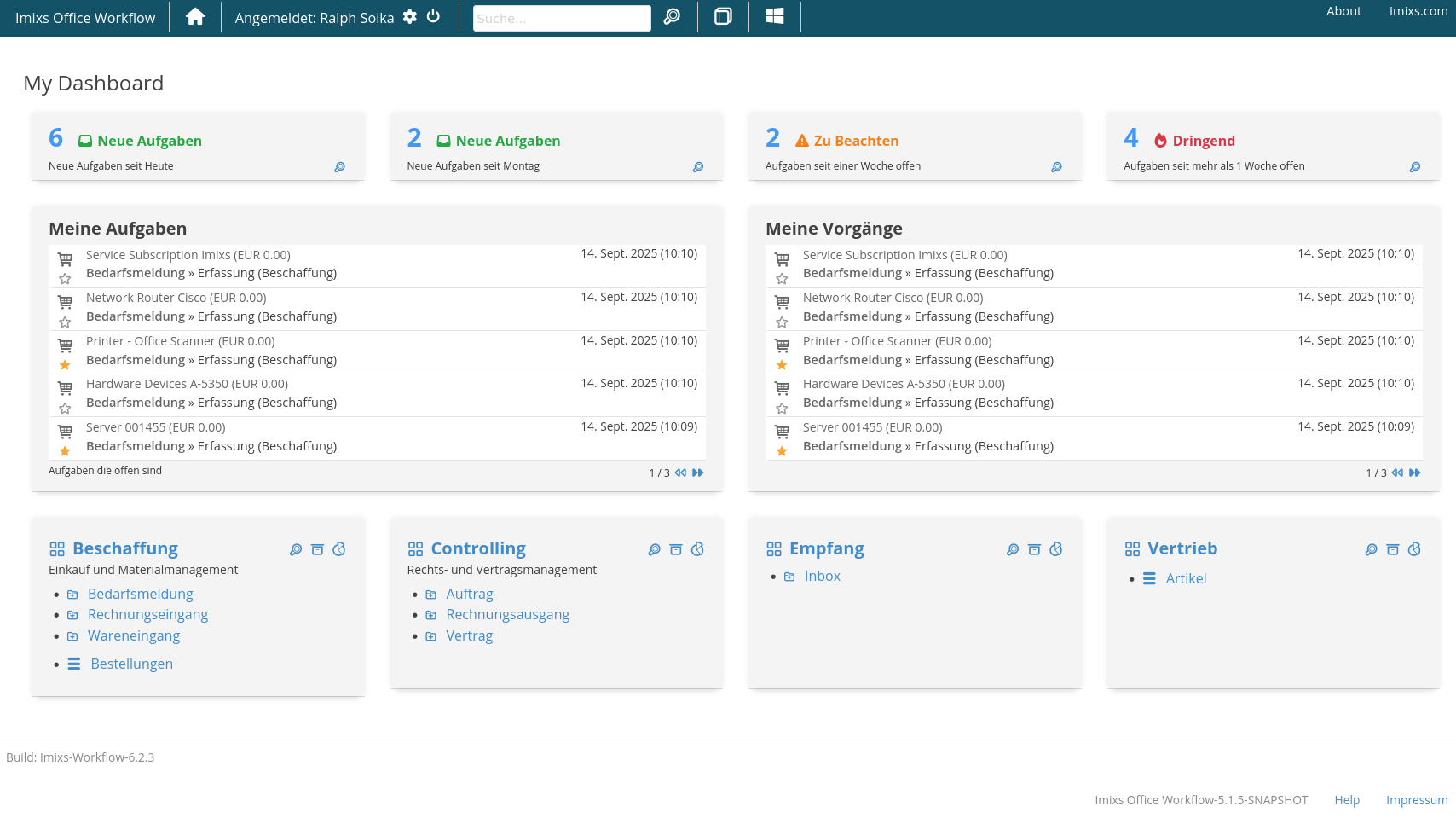
Setup & Layout
To define a new dashboard you simply add a dashboard definition into the layout section of the general configuraiton:
<imixs-form>
  <imixs-form-section columns="4" label="">
     <item name="dashboard.worklist.count.today" type="custom" path="cards/plain"  label=""
           options='{"class":"flat success", "icon":"fa-inbox", "label":"Neue Aufgaben", "description":"Neue Aufgaben seit Heute"}'   />
     <item name="dashboard.worklist.count.oneweek" type="custom" path="cards/plain"  label=""
           options='{"class":"flat warning", "icon":"fa-exclamation-triangle", "label":"Zu Beachten", "description":"Aufgaben seit einer Woche offen"}'    />
     <item name="dashboard.worklist.count.urgent" type="custom" path="cards/plain"  label=""
           options='{"class":"flat error", "icon":"fa-fire", "label":"Dringend", "description":"Aufgaben seit mehr als 1 Woche offen"}'    />
     <item name="dashboard.worklist.count.all" type="custom" path="cards/plain" label=""
           options='{"class":"flat", "icon":"fa-tasks", "label":"Alle Aufgaben", "description":"Meine offenen Aufgaben"}' />
   </imixs-form-section>
   <imixs-form-section columns="2">
     <item name="dashboard.worklist.owner" type="custom" path="cards/worklist"
         options='{ "label":"Meine Aufgaben", "description":"Aufgaben die offen sind"}'/>
     <item name="dashboard.worklist.creator" type="custom" path="cards/worklist"
         options='{ "label":"Meine Vorgänge", "description":""}'/>
   </imixs-form-section>
   <imixs-form-section columns="3" label="">
      <item name="worklist.stats.count.beschaffung" type="custom" path="cards/plain"
            options='{"class":"lead", "key":"process", "value":"Beschaffung"}'   />
      <item name="worklist.stats.chart.beschaffung" type="custom" path="cards/chart"
            options='{"key":"process", "value":"Beschaffung"}'   />
      <item name="worklist.stats.chart.rechnungseingang" type="custom" path="cards/chart"
            options='{"key":"$workflowgroup", "value":"Rechnungseingang"}'   />
   </imixs-form-section>
</imixs-form>
See the layout section for more information about how to arrange elements.
Cards
Da dashboard consists on form card elements located under /cards
Each card can display information provided by the DashboardAnalyticController component. The following table shows an overview about predefined card content:
| Analytic ID | Type | Card | Description | |
|---|---|---|---|---|
| Counter | ||||
| dashboard.worklist.owner.count.today | counter | plain | Counts all new tasks for the current user for this day | |
| dashboard.worklist.owner.count.thisweek | counter | plain | Counts all tasks for the current user since the current week (stared on Monday) | |
| dashboard.worklist.owner.count.oneweek | counter | plain | Counts all tasks for the current user since the last 7 days | |
| dashboard.worklist.owner.count.urgent | counter | plain | Counts all tasks for the current user older then 7 days | |
| dashboard.worklist.owner.count.all | counter | plain | Counts all tasks for the current user | |
| Views | ||||
| dashboard.worklist.owner | view | worklist | Shows a view with all tasks for the current user | |
| dashboard.worklist.creator | view | worklist | Shows a view with all tasks created by the current user | |
| dashboard.worklist.participant | view | worklist | Shows a view with all tasks the current user is a participant | |
| dashboard.worklist.favorite | view | worklist | Shows a view with all favorites tasks marked by the current user | |
| Statistic | ||||
| worklist.stats.count.[NAME] | counter | plain | Shows the count of process instances for a given process or workflow group process | |
| worklist.stats.chart.[NAME] | counter | chart | Shows a chart diagram of process instances for a given process or workflow group process over the last 6 months | |
| Information | ||||
| [PROCESS NAME] | counter | startprocess | Shows information about a process |
Workflow Stats
The ProcessAnalyticController provides different stats for process instances. The following shows a example section that displayes 2 Diagrams
    <imixs-form-section columns="3" label="">
        <item name="worklist.stats.count.sales" type="custom" path="cards/plain"
            options='{"class":"lead", "key":"process", "value":"Sales"}' />
        <item name="worklist.stats.chart.Sales" type="custom" path="cards/chart"
            options='{"key":"$workflowgroup", "value":"Outbound Invoice"}' />

    </imixs-form-section>
The first item shows a counter with all process instances in the process group ‘Sales’, the second one shows a chart diagram with all process instances of the workflow grup ‘Outbound Invoice’ created during the last 6 months.
DataViewAnalyticHandler
The DataViewAnalyticHandler can be used to compute the number of documents of a DataView.
<item name="dataview.stats.products" type="custom" path="cards/plain" options='{ "class":"lead", "label":"Products", "name":"products-view", "description":"All Products"}' />
The name must start with dataview.stats. followed by a unique identifier. The name of the DataView is defined by the option ‘name’. The handler automatically computes the count of workitems and generates the link to the dataview
You can also add an additional filter to refine the DataView Query
Example:
"filter":"(type:workitem) AND ($taskid:5300)"